Monitor Size Translation: HS5 vs Rokit 7 G4 vs Eris E7 XT
By Jae Min Park • 21st Sep
Quick verdict
The best choice depends on your room and workflow, not woofer size alone: choose the Yamaha HS5 for a simple 5-inch-woofer baseline, the KRK ROKIT 7 G4 for a DSP-driven graphic EQ with 25 settings, or the PreSonus Eris E7 XT for its published waveguide and broader tuning controls.
- Choose the HS5 if: You want straightforward ROOM CONTROL, while treating its published low-frequency figure as a listing specification rather than a complete comparison.
- Choose the alternatives if: The ROKIT 7 G4’s adjustable graphic EQ is central to your process, or the E7 XT’s desk-reflection claim, Acoustic Space controls, and stated coverage fit your setup.
Important: The bass-extension claims are not directly comparable because equivalent test conditions and response tolerances are not stated; no independent three-way measurements or genre-specific ranking support an objective winner.
Monitor size translation is not about treating a 5-inch and a 7-inch speaker as versions of the same tool. For creators comparing budget studio monitors, the useful question is simpler: which monitor gives you a repeatable decision-making routine in the space you actually have? The Yamaha HS5, KRK ROKIT 7 G4, and PreSonus Eris E7 XT each offer room-tuning options, but their published woofer sizes, features, and desk-placement priorities ask for different tradeoffs.
The goal is not the most impressive bass at your chair. It is a mix that survives earbuds, a car, and a small speaker without sending you back into revision loops. Start with placement, make one controlled adjustment at a time, and learn the result.
Place, isolate, then decide.
Step 1: Understand what “5-inch”, “6.5-inch”, and “7-inch” really tells you
In this comparison, the numbers identify the published nominal woofer sizes for the specific models: the HS5 has a listed 5-inch cone woofer, the E7 XT a published 6.5-inch woofer, and the ROKIT 7 G4 is identified as a 7-inch monitor. They do not describe cabinet size, a standardized measure of bass quality, or a room-size recommendation.
That distinction matters. Your desk, wall distance, and listening position still affect what reaches your ears. In a compact room, reflected low frequencies can return in or out of phase with the speaker sound, creating peaks and dips. That makes wall distance and listening position part of the setup process.
Here is the practical translation:
- HS5: Yamaha’s retailer listing specifies a 5-inch cone woofer.
- E7 XT: PreSonus publishes a 6.5-inch woofer and per-monitor dimensions of 14.4 inches high, 9.4 inches wide, and 9.5 inches deep.
- ROKIT 7 G4: KRK’s retailer listing identifies it as a 7-inch powered studio monitor.
Do not choose by woofer diameter alone. Choose by the features you need and what you can place correctly, listen to consistently, and keep at a stable level.
Step 2: Start with the Yamaha HS5 if your priority is a simple baseline
The Yamaha HS5 is listed with a 5-inch cone woofer and a 1-inch dome tweeter. Its retailer-published frequency-response figure is 54 Hz to 30 kHz, although the listing does not state the measurement conditions or tolerance. Treat that number as a rough published boundary, not as a direct score against another manufacturer's bass claim.
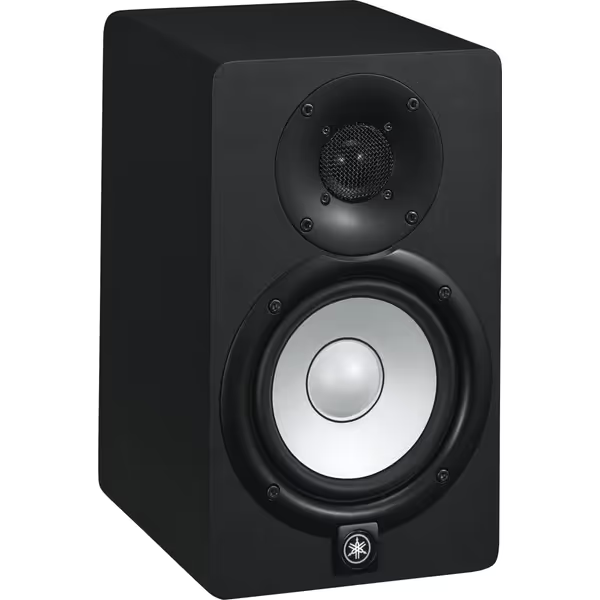
Yamaha HS5 Powered Studio Monitor
Trustworthy audio translation for critical mixing in small rooms.
$149.99
Frequency Response54Hz-30kHz
Frequency Response54Hz-30kHz
Pros
Unbiased sound translates mixes reliably.
Room Control tailors acoustics to imperfect spaces.
Clear, detailed audio reduces ear fatigue.
Cons
Bass response (below 54Hz) may require a subwoofer.
Neutral sound might not appeal to all.
Phenomenal separation of highs, mids, and bass; fills a bedroom-sized room.
Phenomenal separation of highs, mids, and bass; fills a bedroom-sized room.
The key workflow feature is Yamaha's ROOM CONTROL, which adjusts low-frequency response, plus response-tailoring controls intended to help match output to different acoustic spaces. It also offers XLR and TRS inputs; Yamaha specifies that these inputs are not for simultaneous use.
What the HS5's size means in practice
The Yamaha HS5 bass-extension figure is worth framing honestly. The retailer-published 54 Hz figure has no stated measurement conditions or tolerance, so it cannot establish a precise limit or support a direct ranking against another monitor's claim. Instead, use a consistent low-end-checking routine:
- Put your kick and bass relationship in a conservative starting balance.
- Check that balance on one familiar consumer device.
- Return to the HS5 and note whether you consistently over- or under-build low end.
- Correct your habit, not every song from scratch.
This can be a calmer path for small-room work than chasing a larger speaker simply to “get more bass.” You are building a repeatable reference routine.
The HS5 is therefore worth considering when you want a 5-inch-woofer monitor and straightforward ROOM CONTROL. Its controls can help fine-tune a setup, but they are not substitutes for placement, measurement, or room treatment.
Step 3: Consider the KRK ROKIT 7 G4 when adjustable onboard EQ is central to your process
The KRK ROKIT 7 G4 is identified as a 7-inch powered studio monitor. Its listing describes a DSP-driven graphic EQ with 25 settings and a front-firing port.
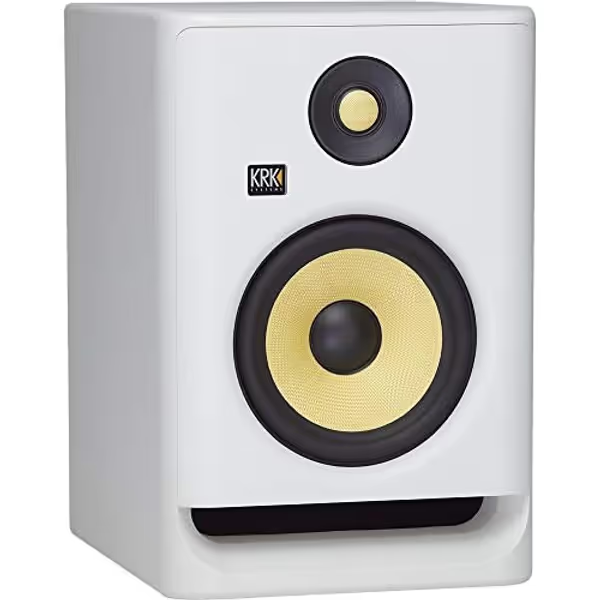
KRK RP7 Rokit 7 G4 Studio Monitor
Accurate sound, versatile DSP EQ, and punchy bass for modern artists.
Woofer Size7"
Woofer Size7"
Pros
DSP EQ adapts to your room acoustics
Exceptional low-end with front-firing port
Versatile for all music genres
Cons
Some users report minor software bugs
Customers praise the excellent, clean sound and surprising bass clarity.
Customers praise the excellent, clean sound and surprising bass clarity.
Those two features make the ROKIT 7 G4 especially relevant to the producer who wants more adjustment options. But keep the order straight: EQ is the final small turn of the steering wheel, not the road itself. First get the speakers and chair into a workable arrangement. Then use one setting at a time to address a repeatable issue.
Do not overread the front-firing port
A front port can be useful in a desk setup, but it does not prove that the monitor can sit any distance from a wall without consequences. The wall still reflects energy, and small rooms still have position-dependent bass peaks and troughs. For practical guidance on getting the speakers to the right height and position, see this studio monitor height guide. There is no verified placement distance that makes the ROKIT 7 G4 automatically safe against a rear wall.
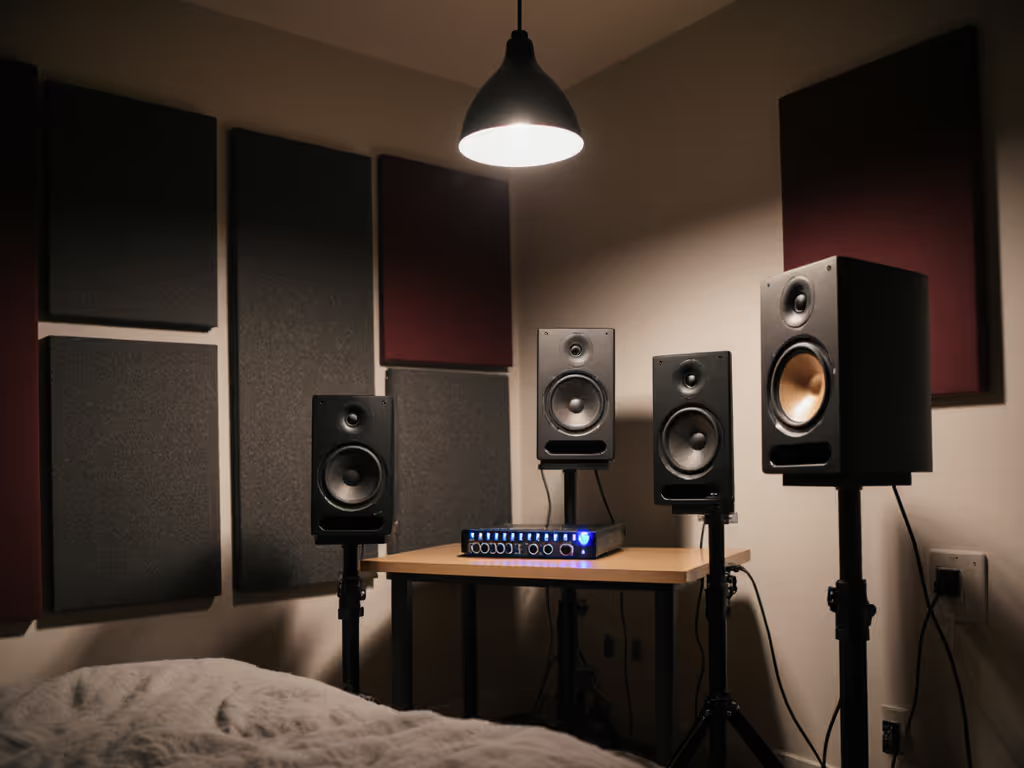
For the ROKIT 7 G4, think in terms of listening distance rather than a magic woofer-to-room formula. A nearfield setup in a small room commonly places the listener about three to five feet from the monitors. Build an equilateral triangle: the distance between speakers should match the distance from each speaker to your listening position. Aim both speakers toward your ears, roughly 30 degrees from the center line.
A safe way to use the KRK EQ
Use this short test instead of cycling through 25 options by feel:
- Start with the flattest setting.
- Play two familiar reference tracks and one of your own mixes.
- Move the speakers or chair before changing EQ.
- If one bass issue remains in the same place after placement adjustments, try one EQ change.
- Live with it for a full session before changing it again.
That last step prevents the classic trap: correcting yesterday's desk position with today's EQ. I saw plenty of students swap gear while their car checks kept failing. The better breakthrough was often much less glamorous, getting the desk off the wall where possible, then decoupling the speakers with a simple support. Suddenly, their choices traveled.
Step 4: Consider the PreSonus Eris E7 XT when desk reflection control and a wider stated listening area matter
The PreSonus Eris E7 XT is a 2-way active studio monitor with an EBM waveguide. PreSonus publishes 100° horizontal by 60° vertical coverage for that waveguide and says its narrower vertical dispersion reduces desk reflections.
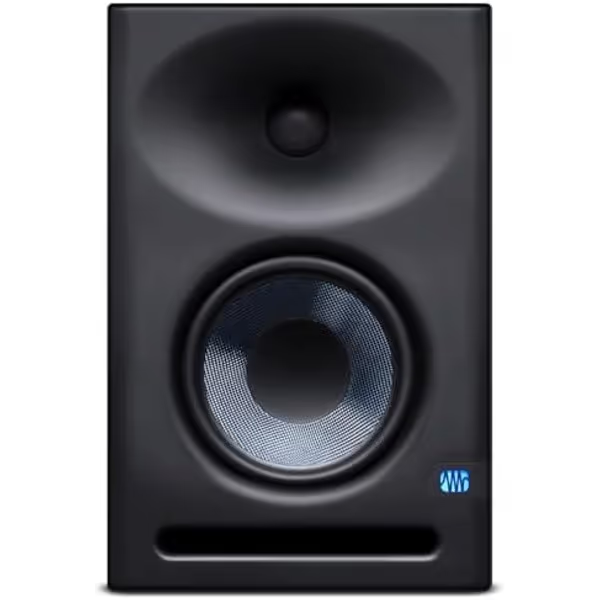
PreSonus Eris E7 XT Studio Monitor
Achieve consistent, professional mixes even in imperfect small rooms.
Waveguide100˚(H) x 60˚(V) EBM for wide sweet spot
Waveguide100˚(H) x 60˚(V) EBM for wide sweet spot
Pros
Accurate room tuning controls prevent muddy bass
Wide sweet spot minimizes imaging shift
Includes Studio One Prime & plugin suite
Cons
Bass may be slightly weak without a subwoofer
Not ideal for very high SPL monitoring
Customers praise the clean, balanced, and detailed sound, with strong clarity across frequencies, though some note bass can be slightly weak alone.
Customers praise the clean, balanced, and detailed sound, with strong clarity across frequencies, though some note bass can be slightly weak alone.
That is the clearest product-specific desk-direction feature in this comparison, but it is still a manufacturer-published specification rather than an independent desk-reflection test. It gives a sensible reason to look closely at the E7 XT if your monitors must live on a desktop.
PreSonus also claims its ported enclosure reaches 42 Hz. Do not use that claim as a precise bass-extension win over the HS5: the published figures do not provide equivalent stated test conditions or response tolerances. What you can say is that the E7 XT has a manufacturer claim that reaches 42 Hz, while the HS5's retailer listing publishes a 54 Hz lower figure.
Why the E7 XT may suit a crowded desk
The E7 XT includes low-cut, mid, high, and three-way Acoustic Space controls. PreSonus says Acoustic Space compensates for boundary bass boost near a wall or corner. Its published per-monitor dimensions are 14.4 inches high, 9.4 inches wide, and 9.5 inches deep, so measure your desk before assuming it will fit comfortably.
For small room low-end management, these controls are useful only after the fundamentals are stable:
- Aim the speakers toward your ears.
- Use the same tuning-control setting on both speakers.
- Make one change, then replay the same reference material.
The E7 XT's published horizontal and vertical coverage also makes it worth considering if you frequently lean, shift in the chair, or collaborate with someone beside you. Do not turn that into a promise that the sweet spot will be wider than either competitor's; comparable coverage data for the HS5 and ROKIT 7 G4 is not available here.
Step 5: Make the choice with a room-first decision tree
Use this checklist instead of a genre-based ranking. There is no reliable basis for declaring one of these monitors objectively best for EDM, rock, dialogue, or any other style.
Choose the HS5 route if:
- You want a monitor with Yamaha’s listed 5-inch cone woofer.
- Your priority is a straightforward nearfield baseline.
- You are prepared to treat the retailer-published 54 Hz figure as a non-comparable specification rather than a bass ranking.
- You prefer simple ROOM CONTROL and response-tailoring adjustments over a menu of DSP choices.
Choose the ROKIT 7 G4 route if:
- You specifically want the KRK model identified as a 7-inch monitor.
- You want a DSP-driven graphic EQ with 25 settings.
- Your desk placement makes a front-firing port appealing (but you will still test wall distance and listening position).
- You are disciplined enough to adjust placement first and EQ second.
Choose the Eris E7 XT route if:
- Desk reflections are a major concern.
- You value the E7 XT's published 100° horizontal by 60° vertical waveguide coverage.
- You need low-cut, mid, high, and Acoustic Space controls as part of your setup process.
- You have measured the desktop and have room for its published cabinet dimensions.
Step 6: Set up any of the three before judging translation
A stable setup beats an endless comparison. For a deeper look at how acoustics and treatment affect monitor performance, read the guide to studio monitor placement and room treatment. Follow this order over a weekend.
1. Build the triangle
Place the monitors and your head at the points of an equilateral triangle. Start within the typical nearfield range of three to five feet from the speakers. Aim the speakers at your ears.
2. Get speakers off the desk when possible
Secure, decoupled stands behind the desk are preferable when space allows. If stands are impossible, place monitors near the front edge of the desktop on foam blocks. The front edge reduces the amount of desk surface directly in front of the speaker, and foam blocks follow the recommended desk-mounted setup when stands are not possible.
3. Aim from the triangle
From the equilateral triangle, aim both monitors toward your ears at approximately 30 degrees to the center line. Room effects depend on your listening position and the speakers’ relative positions, so rear-panel controls should not replace careful placement.
4. Start controls neutral
Begin with neutral or flat settings. Then listen to familiar material at a consistent, moderate level. Do not make low-end choices based on one loud playback burst.
5. Change one variable only
Move the chair, alter toe-in, or change one control (not all three). Write down what changed. A monitoring routine is like a compass: it only helps if north stays in the same place.
Final takeaway: choose the monitor you can learn, not the one you hope will rescue the room
The HS5, ROKIT 7 G4, and Eris E7 XT have different published woofer sizes and feature sets. The better choice is still governed by your actual desk, wall distance, listening triangle, and willingness to use controls carefully.
If you want the cleanest next move, measure your desktop, mark a three-to-five-foot listening range with tape, and set up a temporary triangle before buying (or before returning) anything. Then compare the feature that solves your real constraint: HS5 simplicity, ROKIT 7 G4 DSP-driven EQ options, or E7 XT desk-focused waveguide and tuning controls.
Set it right once; spend your energy finishing songs.
For further exploration, keep a short translation log for five mixes: what you heard on the monitors, what changed on earbuds or in the car, and what setup adjustment you made. Within a few projects, that log will be more valuable than another week of spec-sheet browsing.
Related Articles