USB Studio Monitor Comparison for Small Desk Mix Accuracy
By Lila Okafor • 25th Sep
Quick verdict
The Behringer Studio 50USB is the model to investigate when direct USB connectivity is essential; the Mackie CR5-XBT is an analog/Bluetooth alternative with documented input flexibility and headphone muting. Neither can be named the more mix-accurate monitor from the available evidence.
- Choose the Behringer if: You want a computer-to-monitor USB workflow, but verify current operating-system behavior, driver support, and quiet-level control yourself.
- Choose the Mackie if: You already use an analog output or value Bluetooth, multiple line inputs, and a headphone jack that mutes the speakers.
- Main trade-off: The Behringer has evidence of a direct USB audio path, while the Mackie has better-documented analog/Bluetooth features. No controlled measurements support a translation winner.
Important: Bluetooth and USB latency are not established, and the Behringer’s USB evidence includes a single 2016 reviewer report rather than current manufacturer support documentation.
A useful USB studio monitor comparison begins by separating a direct USB-audio connection from USB-adjacent desktop convenience. That distinction matters more than product naming when you are choosing USB desktop studio speakers for a compact desk: it determines how your computer connects, how you set level, and whether the workflow suits focused editing rather than casual playback. Based on available information, the Behringer Studio 50USB and Mackie CR5-XBT are not interchangeable versions of the same idea, and neither has the controlled comparative measurements needed to crown a mix accuracy winner.
The practical headline is simple: the Behringer is the USB-equipped option; the Mackie is an analog/Bluetooth option. The rest of the decision is about which signal path creates fewer unknowns at your desk.
Curves matter, but only as far as rooms allow.
The comparison is connectivity first, not an accuracy shoot-out
Small-room creators often ask which monitor will make mixes translate better. That is the right outcome, but it is not a question that a connection list can answer. There are no controlled, like-for-like response, distortion, imaging, maximum-output, or nearfield-room measurements here for both models. So a claim that either monitor is inherently more accurate, wider sounding, or better for translation would be decoration, not proof.
Instead, use this comparison to choose a workflow you can repeat. An analog monitor route may fit an existing interface or analog output more naturally. Bluetooth adds casual playback convenience, but it is not documented here as a low-latency recording-monitoring path.
At-a-glance: what is actually documented
| Question | Behringer Studio 50USB | Mackie CR5-XBT |
|---|---|---|
| Direct USB audio documented? | A retailer describes USB connectivity; a 2016 independent reviewer reported an internal USB DAC and USB Type-B computer connection. | No. The owner's manual documents analog computer connection, not USB audio. |
| Analog inputs documented? | A retailer describes analog connectivity, without a cited official connection document. | [Yes: 1/4-inch, RCA, and 1/8-inch stereo inputs. |
| Bluetooth documented? | Not established here. | Yes; the manual documents Bluetooth streaming for the CR-XBT range. |
| Headphone behavior documented? | Not established here. | Plugging headphones into the front 1/8-inch jack defeats speaker output. |
| Mix-accuracy winner supported? | No. | No. |
That table may feel less satisfying than a ranked verdict. It is more useful. A desktop monitor should not earn trust because it produces an exciting first impression; it earns it when the connection and level behavior let you hear the same decision tomorrow that you heard today.
Behringer Studio 50USB: the direct-USB candidate, with caveats
The Behringer Studio 50USB is the only product in this comparison with information pointing to a direct USB audio path. Its retailer listing describes USB and analog connectivity. Separately, one independent reviewer in 2016 reported an internal DAC and use via a USB Type-B cable from a computer.
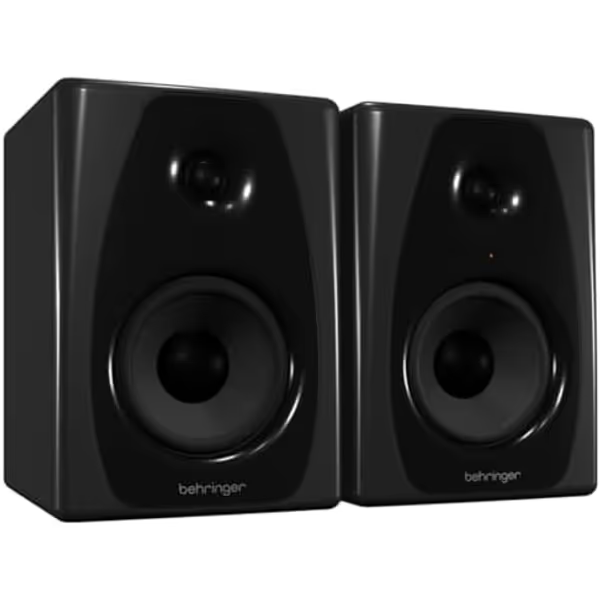
Behringer Studio 50USB Monitors
Compact powered monitors for accurate mixing with USB connectivity.
Power Output150W
Power Output150W
Pros
Integrated USB for direct digital audio
Compact 5-inch woofer fits small desks
Versatile XLR and TRS analog inputs
Cons
Bass response may be limited for some genres
Less advanced room correction features
For buyers prioritizing a computer-to-monitor connection without relying on the computer's analog output, the available retailer information and 2016 review make the Studio 50USB the direct-USB candidate in this comparison.
But the caveats are not minor. The same 2016 reviewer reported that Windows switched to the speakers without software installation, yet that is one older observation, not proof of current operating-system compatibility, driver availability, class-compliant status, sample-rate support, or low-latency behavior. Treat it as a historical usability report, not a current support promise.
The reviewer also found quiet USB listening difficult, needing minimum rear gain and a very low Windows volume setting. For apartment work, that is worth testing early: play your usual edit level, then make sure the operating-system volume range leaves enough fine control. The reviewer reported no audible idle hiss or hum in their conditions, but there is no equivalent information here to make a broad noise comparison.
Who should put it first on the shortlist?
Choose the Studio 50USB for further investigation if these statements describe your setup:
- You specifically want a documented USB-equipped monitor pair rather than an analog-only computer connection.
- You can verify behavior on your computer and operating system before relying on it for sessions.
- You are willing to test low-level volume control, because quiet work is central to your routine.
- You accept that current driver and latency details are not established here.
Do not buy it on a published power figure from the retailer listing. The available listing is internally inconsistent on power, so it does not support a reliable specification.
Mackie CR5-XBT: analog inputs and Bluetooth, not USB audio
The Mackie CR5-XBT monitoring workflow is different. Mackie's manual identifies it as part of the CR-XBT multimedia-monitor range and documents Bluetooth streaming plus line-level 1/4-inch, RCA, and 1/8-inch stereo inputs. For a computer, Mackie illustrates an analog connection from a computer's 1/8-inch output to the monitors' RCA inputs; the 1/4-inch inputs are another option.
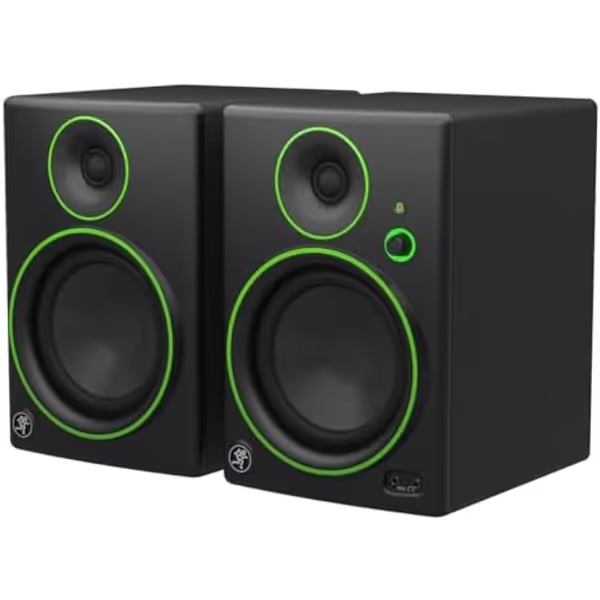
Mackie CR-X Series 5.25-Inch Bluetooth Monitors
Studio-quality sound with versatile connectivity for any small space.
Power Output80 Watts
Power Output80 Watts
Pros
Clear, articulate sound translates well.
Flexible inputs including Bluetooth for convenience.
Isolation pads included for better desk placement.
Cons
May lack sub-bass punch for critical EDM/hip-hop.
Not designed for large room or high SPL monitoring.
This is useful flexibility, but call it what it is: analog or Bluetooth desktop monitoring. The manual does not document direct USB audio or a USB driver. If USB is a purchase requirement, the CR5-XBT does not meet that requirement based on available information.
The Mackie has two desk-use details that are unusually concrete. First, its 1/4-inch inputs accept balanced or unbalanced line-level sources. Mackie states that balanced operation offers better noise rejection and is preferred especially for runs longer than 6 m. That does not turn a monitor into a noise-free system, but it gives you a documented route to use when your source provides balanced outputs.
Second, the front headphone jack automatically defeats the speaker output, with the front level control governing headphone level. For a shared-room desk, that is a meaningful operational feature: a headphone check does not require separately muting the speakers.
Mackie also includes isolation pads and says they can minimize boomy bass buildup while providing tilt adjustment for focused listening. That is the manufacturer's stated purpose, not an independently verified result. Still, a pad with tilt control is a sensible item to evaluate at a desk where height and aiming options are constrained.
One restriction deserves attention: Mackie says not to feed the rear 1/4-inch and RCA inputs with more than one signal at a time because the connector types are electrically connected. Do not treat them as separate mix and playback channels.
Who should put it first on the shortlist?
Investigate the CR5-XBT when your priority is input flexibility rather than a USB cable straight from computer to speaker:
- You already have an analog source or want to use a computer's analog output.
- Bluetooth streaming is useful for non-critical listening or quick playback checks.
- A front headphone jack that mutes the speakers fits your daily routine.
- You can use a balanced 1/4-inch feed where your source supports it, particularly over longer cable runs.
Do not infer anything about Bluetooth latency from its presence. No measured Bluetooth or end-to-end latency figure is established here, so it is not a basis for judging real-time tracking or monitoring.
Where the Alesis Elevate 5 MKII fits, and does not fit
The Behringer STUDIO 50USB vs Alesis Elevate 5 MKII search framing is also misleading if the question is USB. Alesis documents RCA and 1/4-inch TRS inputs on the Elevate 5 MKII, plus a 1/8-inch headphone connection that defeats the speakers. Its specified output is 40 W per channel, 80 W total.
What the available Alesis information does not establish is USB audio or Bluetooth. Therefore, it belongs in an analog-I/O comparison, not a direct-USB monitor shortlist. It also cannot be declared more or less accurate than the Behringer or Mackie from these connection facts.
A one-meter reality check before you decide
At a desk, connectivity is only the beginning. Our guide to ultra-close desk mixing can help you consider your own listening position and desk setup. A One-meter reality check is the discipline of separating what a monitor is documented to do from what your room, desk, listening position, and gain structure cause you to hear.
Use this short evaluation plan for either path:
- Define the route first. For the Studio 50USB, verify direct USB operation on your own computer. For the CR5-XBT, choose one analog input path at a time; do not connect concurrent RCA and 1/4-inch sources.
- Test your quietest real working level. Make dialogue edits, vocal balances, or low-level arrangement decisions rather than only playing a loud familiar track. The older Studio 50USB report makes low-level gain control a specific item to check.
- Make connection changes one at a time. If hum or noise appears, do not simultaneously swap cables, move power connections, and change source level. You will lose the cause.
- Listen from your actual work position. Small desk monitoring is not a showroom audition. The question is whether the balance remains usable during your normal editing posture and working routine.
- Keep a translation log. After a few projects, note recurring changes you make when checking elsewhere. The pattern, not first-day excitement, tells you whether the workflow is helping.
I have watched a seemingly attractive top end become less persuasive the moment it was considered alongside a desk-related low-frequency bump and a changed aiming position. The useful lesson was not "never enjoy sparkle." It was to stop asking one isolated trait to carry the entire decision. A repeatable setup is more valuable than a dramatic first listen.
Verdict: choose the connection requirement, then verify the desk behavior
This is not a valid USB shoot-out. The supported conclusion is narrower:
- Behringer Studio 50USB: the appropriate model to investigate when direct USB connectivity is the core requirement, subject to hands-on confirmation of current computer compatibility and quiet-level control.
- Mackie CR5-XBT: the better-documented choice when you need analog input options, Bluetooth streaming, and a front headphone output that mutes the speakers, but not when you require direct USB audio.
- Alesis Elevate 5 MKII: an analog-I/O alternative, not a documented USB or Bluetooth choice in the material available here.
No model earns a defensible small-room mix-accuracy crown from this information. That restraint is not a non-answer; it protects you from buying an appealing connection feature and mistaking it for verified translation performance.
FAQ
What are some good speakers that work with USB?
Within this comparison, the Behringer Studio 50USB is the model with USB connectivity described by a retailer and USB DAC use reported by one independent reviewer in 2016. Those facts establish it as a USB-equipped candidate, not as a universal recommendation or a verified accuracy leader.
How do I connect these studio speakers to a PC?
For the Mackie CR5-XBT, its manual illustrates connecting a computer's 1/8-inch output to the monitors' RCA inputs; it also supports 1/4-inch line inputs. For the Behringer Studio 50USB, one 2016 reviewer reported USB Type-B connection to a computer. Verify the Behringer's behavior on your current system before planning a session around it.
Is XLR or TRS better for these monitors?
Mackie documentation supports balanced or unbalanced 1/4-inch connections and says balanced signals provide better noise rejection, particularly with cables longer than 6 m. It does not provide a direct XLR-versus-TRS comparison, and the available Behringer evidence comes from a retailer and an independent reviewer rather than official manufacturer connection documentation.
Continue your evaluation with the right questions
Before purchasing, explore the current manuals and support information for your operating system, then audition the exact connection route you will actually use. Start with the Studio 50USB if a USB-equipped monitor is non-negotiable; start with the CR5-XBT if analog flexibility, Bluetooth, and front-panel headphone switching matter more. In either case, judge the result over a handful of real projects, not a single impressive playback session.
Related Articles